Webflow API: The Complete Technical Guide for 2026
Learn how to use the Webflow API to automate website updates, integrate with third-party services, and build custom applications for your Webflow projects.


On this page
Introduction to the Webflow API
The Webflow API provides programmatic access to Webflow's powerful website building platform, enabling developers to automate workflows, integrate with third-party services, and create custom applications that extend Webflow's native capabilities. As more businesses adopt Webflow for its visual design features, the API offers a bridge between Webflow's no-code interface and custom development needs.
This technical guide explores how to leverage the Webflow API effectively in 2026, covering everything from authentication and key endpoints to practical use cases and optimization strategies. Whether you're a developer looking to automate content updates, an agency managing multiple client sites, or a business owner seeking to integrate Webflow with your existing systems, this guide will help you unlock the full potential of the Webflow API. For broader context on Webflow development best practices, check out our Webflow Developer's Guide.
Webflow API Basics
The Webflow API is a REST API that uses standard HTTP methods to perform operations on Webflow resources. The API follows RESTful principles, making it intuitive for developers familiar with modern web development practices.
API Architecture
The API is built around these core components:
- Base URL: All API requests start with
https://api.webflow.com - API Version: Currently at v2 for most endpoints
- Request Format: JSON for request bodies
- Response Format: JSON responses with appropriate HTTP status codes
Rate Limits
Webflow enforces rate limits to ensure platform stability:
- Free plans: 60 requests per minute
- Site plans: 120 requests per minute
- Workspace plans: 180 requests per minute
Exceeding these limits results in 429 (Too Many Requests) responses. Implementing proper request throttling and error handling is essential for production applications.
Authentication
Before making API requests, you need to authenticate with the Webflow API. The platform supports two primary authentication methods.
API Tokens
For server-side applications and scripts, API tokens provide a straightforward authentication method:
- Log in to your Webflow account
- Navigate to Account Settings > Integrations
- Generate a new API token with appropriate scopes
Once created, include the token in your API requests using the Authorization header:
Authorization: Bearer YOUR_API_TOKENAPI tokens should be kept secure and never exposed in client-side code.
OAuth 2.0
For applications that need to access Webflow on behalf of users, OAuth 2.0 provides a secure authorization flow:
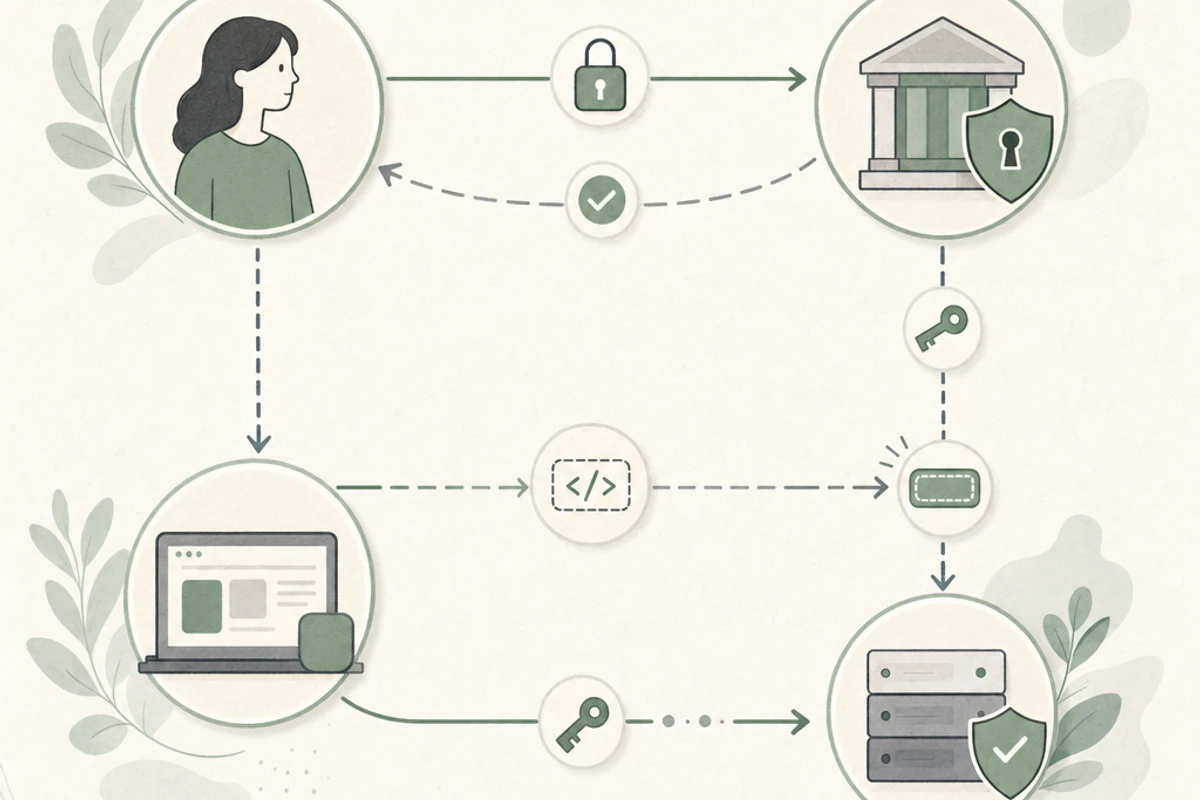
- Register your application in the Webflow Developer Portal
- Implement the OAuth 2.0 authorization code flow
- Request specific scopes based on your application's needs
- Exchange the authorization code for an access token
The OAuth flow is ideal for third-party integrations and applications that need to access multiple user accounts.
Key API Endpoints
The Webflow API offers a comprehensive set of endpoints for interacting with different aspects of your Webflow sites.
Sites Endpoint
The /sites endpoint allows you to retrieve information about sites you have access to:
GET https://api.webflow.com/sitesThis endpoint returns a list of sites with their IDs, names, and other metadata. The site ID is a crucial parameter needed for most other API operations.
Collections Endpoint
To interact with Webflow CMS collections:
GET https://api.webflow.com/sites/{site_id}/collectionsThis endpoint returns all collections for a specific site, including their schemas and configuration.
Items Endpoint
To work with collection items (content):
GET https://api.webflow.com/collections/{collection_id}/itemsThis endpoint allows you to retrieve, create, update, and delete items within a collection.
Webhooks Endpoint
To set up event notifications:
POST https://api.webflow.com/sites/{site_id}/webhooksWebhooks allow your application to receive notifications when specific events occur in Webflow, such as when collection items are created or updated.
CMS Operations
The Webflow API's CMS capabilities are particularly useful for content automation and integration scenarios.
Reading CMS Items
To retrieve items from a collection:
GET https://api.webflow.com/collections/{collection_id}/itemsThis request supports several query parameters for filtering and pagination:
limit: Number of items to return (default: 100, max: 100)offset: Number of items to skipsort: Field to sort byfilter: Filter items based on field values
Creating CMS Items
To add new items to a collection:
POST https://api.webflow.com/collections/{collection_id}/itemsThe request body should include fields that match the collection's schema:
{
  "fields": {
    "name": "New Product",
    "slug": "new-product",
    "description": "Product description",
    "price": 99.99
  }
}
Updating CMS Items
To modify existing items:
PATCH https://api.webflow.com/collections/{collection_id}/items/{item_id}Include only the fields you want to update in the request body.
Publishing CMS Items
Created or updated items are not automatically published. To publish items:
PUT https://api.webflow.com/collections/{collection_id}/items/publishInclude an array of item IDs in the request body to specify which items to publish.
API Limitations
While powerful, the Webflow API has certain limitations developers should be aware of.
Design and Layout Limitations
The API primarily focuses on content management rather than design:
- Cannot create or modify design elements (layout, styles, interactions)
- No direct access to the Designer API used by Webflow's visual editor
- Cannot create or modify custom code components
For design changes, you'll still need to use Webflow's visual editor.
E-commerce Limitations
The API offers limited e-commerce capabilities:
- Can read product information but cannot create or update products directly
- Limited order management capabilities
- No direct access to payment processing or cart functionality
For advanced e-commerce needs, consider migrating from Webflow to Shopify or using specialized e-commerce APIs alongside Webflow.
Performance Considerations
Working within API constraints requires thoughtful planning:
- Rate limits restrict high-volume operations
- Bulk operations need to be carefully managed
- Publishing delays can impact time-sensitive content updates
Using our Website Optimizer can help identify if API integrations are affecting your site's overall performance.
Practical Use Cases
The Webflow API enables numerous practical applications that extend Webflow's native capabilities.
Content Automation
Automate content workflows with the API:
- Scheduled content updates and publications
- Bulk content imports from external systems
- Content syndication across multiple Webflow sites
- Automated content translations
These automations can significantly reduce manual content management efforts.
Custom Admin Dashboards
Build specialized interfaces for specific workflows:
- Custom content management dashboards for non-technical users
- Specialized approval workflows
- Content calendars and scheduling tools
- Analytics and reporting interfaces
Third-party Integrations
Connect Webflow with other business systems:
- CRM systems for customer data synchronization
- Marketing automation platforms
- ERP and inventory management systems
- Data analytics and reporting tools
These integrations create a unified ecosystem around your Webflow site.
Dynamic Content Systems
Create more responsive content experiences:
- Personalized content based on user data
- Real-time data displays (inventory, pricing, availability)
- User-generated content integration
- Content recommendations and related items
For sites with dynamic content needs, comparing Webflow vs WordPress may help determine the best platform for your specific requirements.
Performance Optimization
To get the most from the Webflow API while maintaining site performance, consider these optimization strategies.
Caching Strategies
Implement effective caching to reduce API calls:
- Cache frequently accessed data locally
- Implement time-based cache invalidation
- Use CDNs to cache API responses when appropriate
Proper caching can dramatically reduce API usage and improve application performance.
Batch Processing
For bulk operations:
- Group related API calls into batches
- Implement queuing systems for large operations
- Schedule resource-intensive operations during off-peak hours
These approaches help manage rate limits and reduce server load.
Robust Error Handling
Build resilient applications with proper error management:
- Implement retry logic with exponential backoff
- Handle rate limit errors gracefully
- Log and monitor API interactions
- Implement circuit breakers to prevent cascading failures
Our Webflow Developer's Guide provides additional best practices for handling errors in production environments.
Monitoring API Performance
Keep track of your API usage and performance:
- Monitor rate limit consumption
- Track API response times
- Set up alerts for unusual API activity
- Analyze patterns to optimize usage
Our Form Health Monitor can help track form submissions that might integrate with API workflows.
Tools and Resources
Several tools and resources can help you work more effectively with the Webflow API.
API Clients and SDKs
Leverage existing tools to speed up development:
- Official Webflow.js: JavaScript library for browser and Node.js
- Community SDKs: Wrappers available for Python, PHP, Ruby, and other languages
- API Testing Tools: Postman collections and environments for Webflow API
Monitoring and Optimization Tools
Keep your API integrations performing well:
- Our Heavy Asset Finder: Identify performance issues caused by large assets that might be managed through the API
- Our Form Health Monitor: Track form submissions that might integrate with API workflows
- API Analytics Platforms: Monitor API usage, performance, and errors
Learning Resources
Expand your knowledge with these resources:
- Official Webflow API Documentation: Comprehensive reference for all endpoints
- Webflow University: Tutorial videos and guides for API usage
- Community Forums: Discussions and solutions for common API challenges
- GitHub Examples: Open-source projects showcasing Webflow API integration
For deeper insights on optimizing Webflow performance in general, check our guide on Google Page Loading Speed.
Integration Platforms
Simplify your integration workflow:
- Zapier: Connect Webflow to 3,000+ apps without coding
- Integromat (Make): Visual automation platform with Webflow support
- n8n: Open-source workflow automation tool
These no-code/low-code platforms can complement direct API usage for simpler integration scenarios.
Conclusion
The Webflow API offers powerful capabilities for extending and automating your Webflow projects. By understanding its capabilities, limitations, and best practices, you can create sophisticated integrations and workflows that enhance your Webflow experience.
As you explore API-driven solutions, remember that performance and user experience should remain priorities. Thoughtful API usage can enhance your site's capabilities without compromising on speed or reliability. For projects involving heavy API usage, our Page Shield can help protect your site from potential performance issues.
Whether you're building custom content workflows, integrating with third-party systems, or creating specialized applications, the Webflow API provides the foundation for extending Webflow beyond its native capabilities. For large-scale projects, consider consulting with specialized Webflow developers who have experience with API integrations.
For managing bandwidth concerns that might arise from API-intensive operations, our guide on reducing Webflow bandwidth offers additional optimization strategies.